// Documentation Guide
Market Sentiment
Live bid/ask pressure read on the active symbol, enriched with optional Hyperliquid pair and market-wide context.
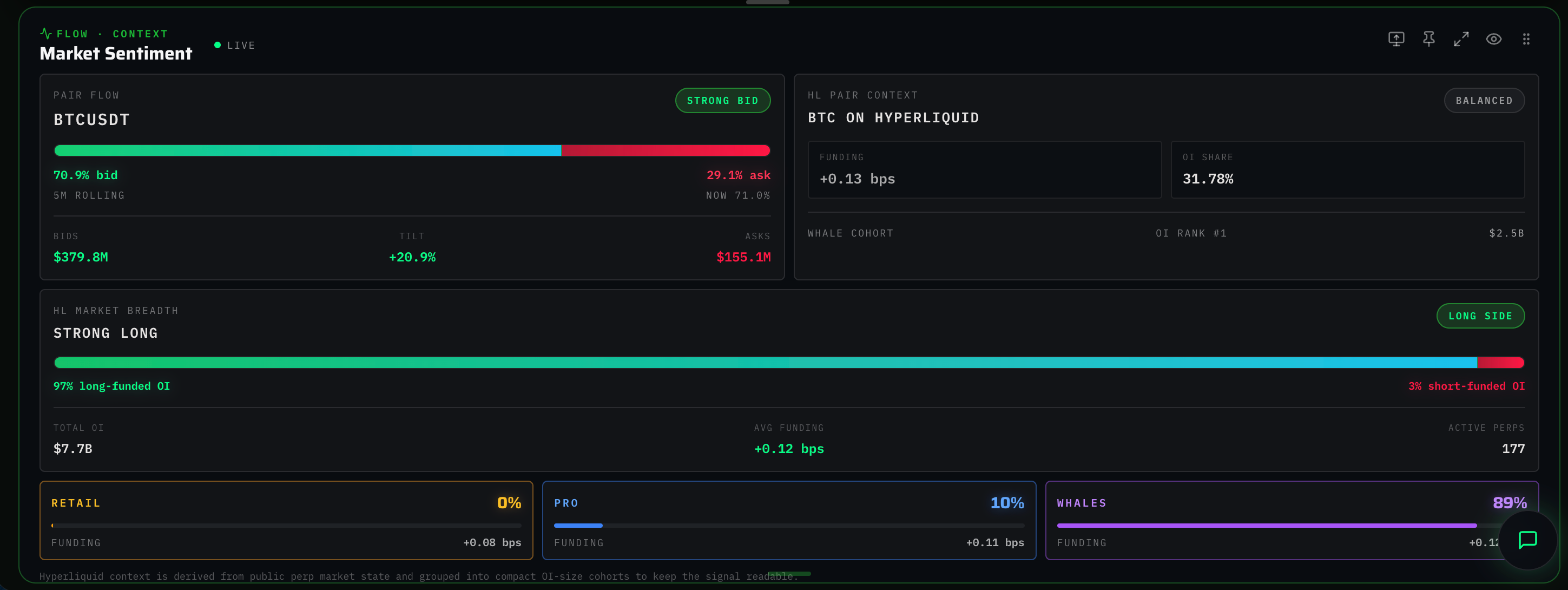
What it shows
Market Sentiment answers a single structural question:
Is the order book leaning bid-heavy or ask-heavy — and how does that compare to broader perp market positioning?
The panel displays the Pair Flow read, derived directly from the active symbol's L2 book:
- A horizontal neon bar split into a green (bid) side and a red (ask) side. Width is proportional to the 5-minute rolling notional share each side holds.
- The current spot percentage ("Now") below the bar.
- Three compact stats: total bid notional, tilt vs. balanced (50/50), and total ask notional.
A live dot in the header glows green when the widget mounts. It represents active workspace presence, not network state. If the backend stream drops, the widget defaults to client-side calculations from the raw order book.
How to read it
- Bar tilts green → Strong Bid / Bid Led: Limit buyers dominate the visible book. If price climbs, the move has structural support.
- Bar tilts red → Strong Ask / Ask Led: Limit sellers dominate. If price falls, the move has supply-side support.
- Balanced: Book is roughly symmetrical; no clear directional bias exists.
- Tilt stat: A positive percentage indicates more bid notional than ask; a negative percentage indicates the opposite. Values inside ±1% are effectively flat.
The 5-minute average smooths out short bursts, exposing positioning trends rather than isolated ticks.
Hyperliquid context (optional)
When backend data is available, the widget expands three additional panels:
- HL Pair Context: If the active symbol trades on Hyperliquid, displays funding (basis points), open-interest share, and the cohort holding the most OI.
- HL Market Breadth: Aggregate long-funded vs. short-funded OI across every Hyperliquid perp. Exposes broader perp-trader bias.
- Cohort segments: Three compact cards summarizing bias for the largest cohorts (whale, pro, retail-style groupings).
If the endpoint drops or the active symbol is not mapped on Hyperliquid, these panels hide automatically, reverting the widget to its compact Pair Flow view.
Tips for trading
- Use Market Sentiment as context, not an entry signal. A strong bid skew with no price follow-through indicates liquidity is present but aggressive flow is absent.
- Compare Pair Flow bias against HL Market Breadth bias. Divergence between the two often precedes mean reversion. For example, if the pair is bid-led but HL is short-funded, squeeze risk increases on the perp side.
- Combine with Open Interest and the Funding Tracker for comprehensive positioning context.
Limitations
- Bid/ask totals reflect only the visible L2 book; resting iceberg orders are invisible. Treat extreme skews as suggestive, not definitive.
- The Hyperliquid layer operates best-effort. When API rate limits hit or a symbol is unmapped, panels hide instead of throwing errors.
- The live indicator dot reflects widget activity, not stream health. If data halts, the bar position freezes.